
Payroll Processing Software for Complete Salary Processing
Run monthly payroll, review payable amounts, catch payroll issues, verify employee salaries, and move from salary processing to payslips in one payroll workflow.
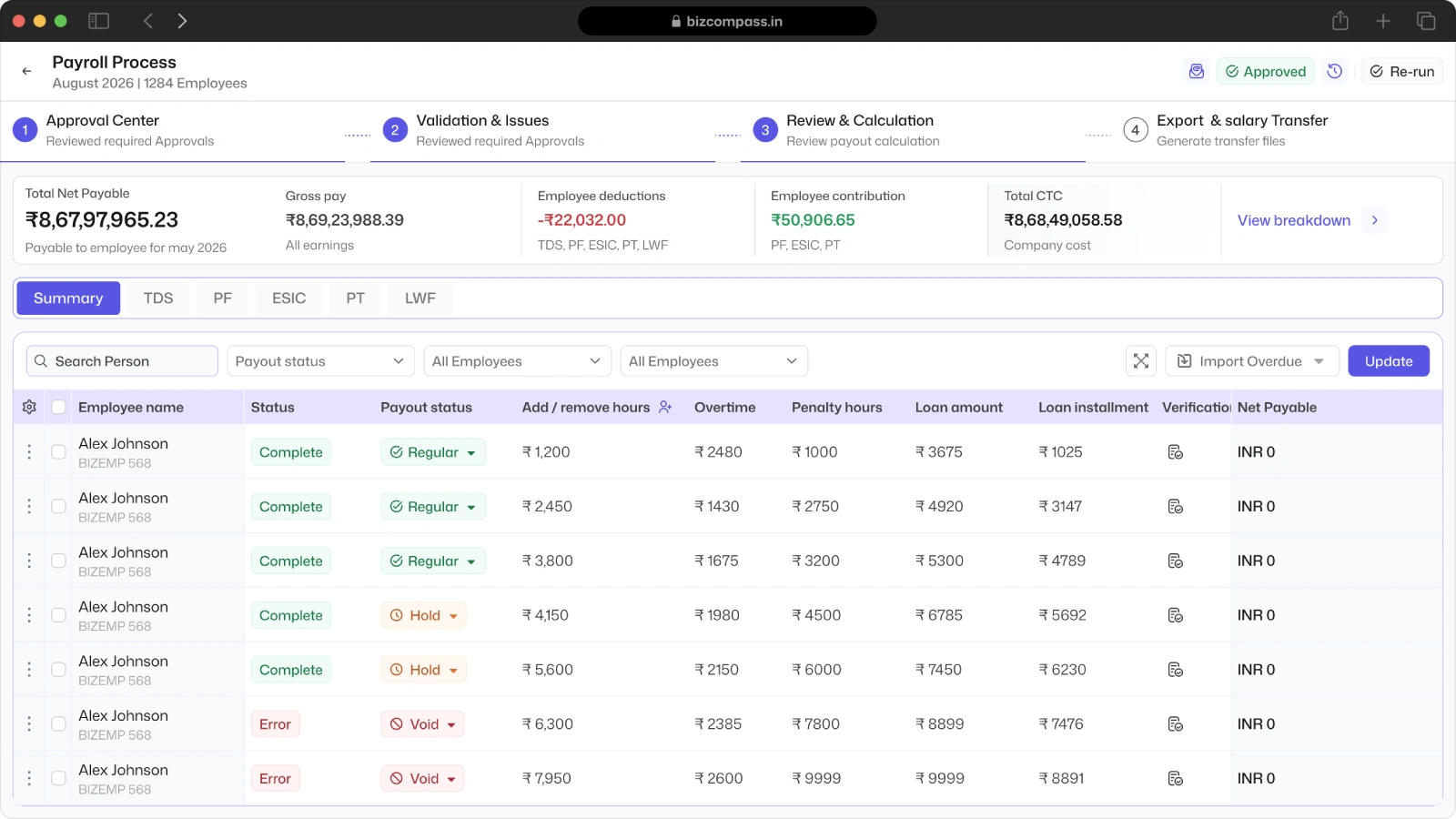
Manage Every Payroll Run From One View
See each payroll month, employee count, pending employees, payroll status, net payable, approvals, payroll date, salary transfer status, and available actions from one payroll processing view.
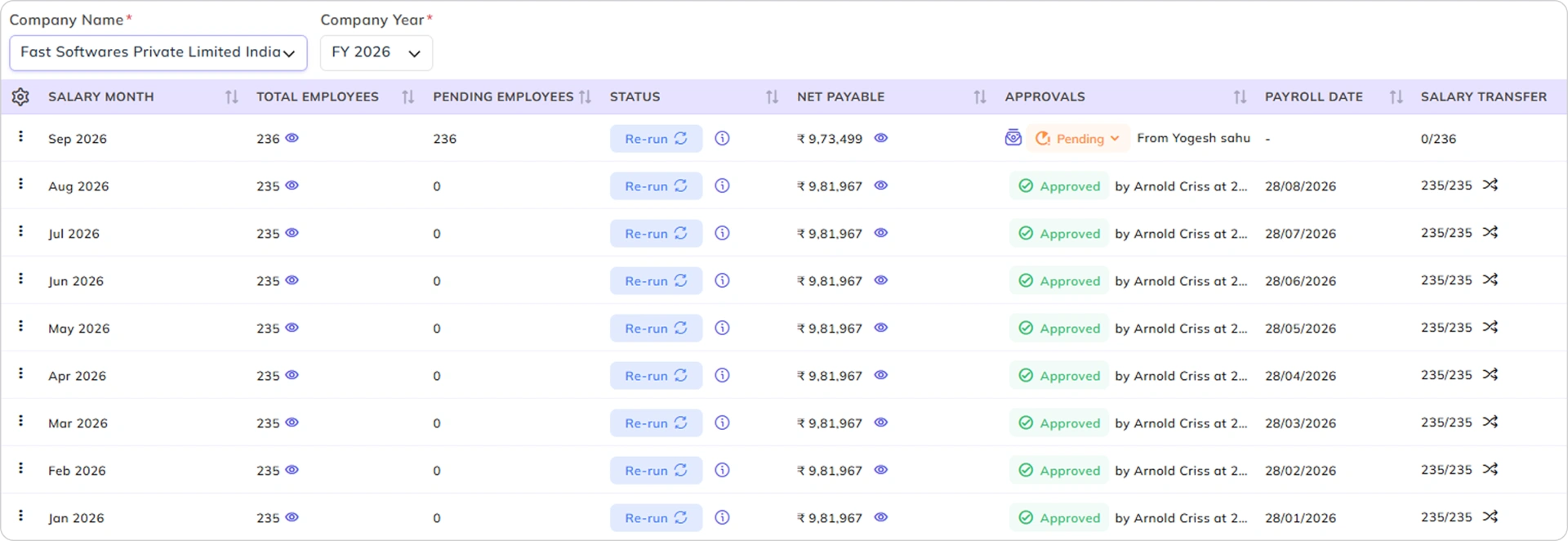
Know What Needs Action Before Payroll Moves Forward
See pending employees, approval status, and payroll progress for each month so your team knows where the payroll run stands.
Re-Run Payroll When Corrections Are Needed
Re-run the payroll when payroll inputs or employee salary details need to be corrected before the cycle is completed.
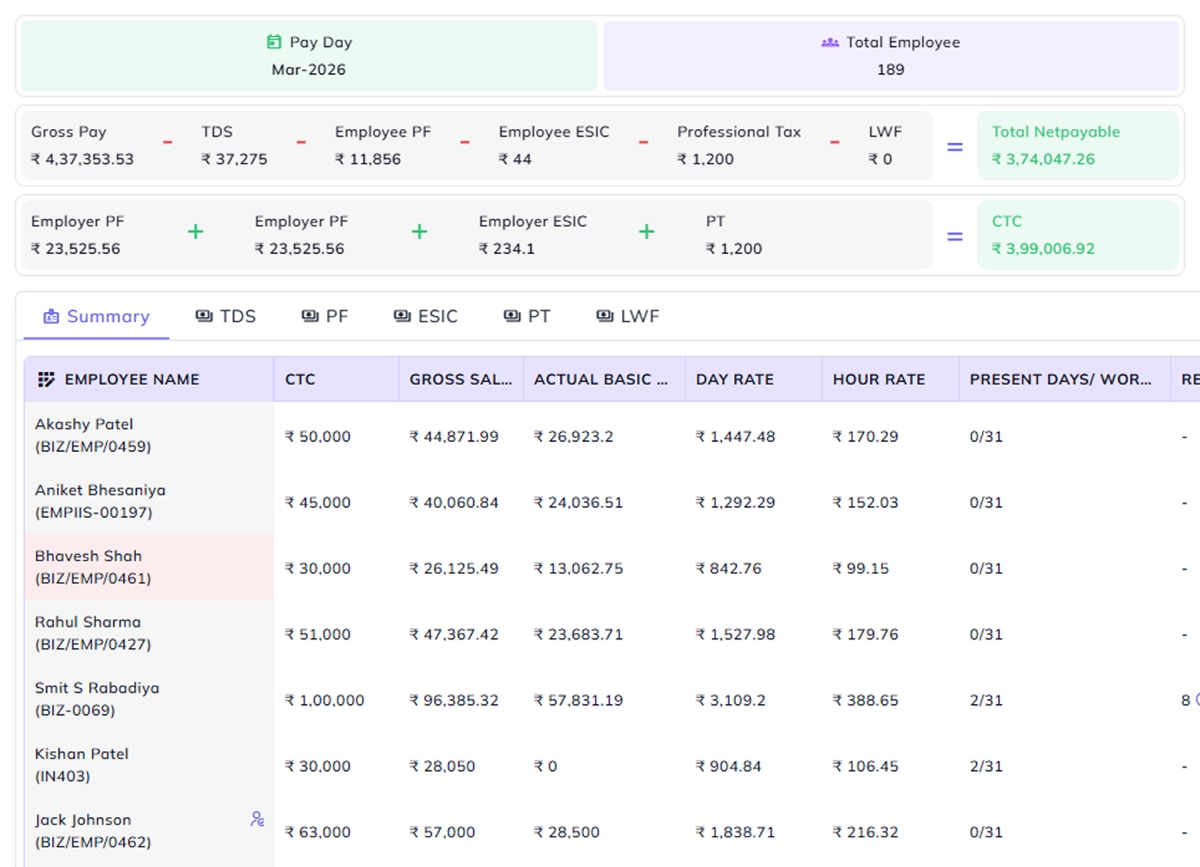
See Exactly What Your Payroll Will Pay
Open the monthly payable view to see the total payroll amount and the employee-level salary figures behind it before salaries are transferred.
Check Every Employee's Net Payable
Open the employee-level breakdown to see how earnings, deductions, adjustments, attendance inputs, and applicable payroll components contribute to each employee's final payable amount.
See the Total Payroll Cost for the Month
Review the month's payroll total along with major payroll amounts such as gross pay, TDS, PF, ESIC, Professional Tax, employer contributions, and CTC.
Find Payroll Issues Before They Affect Salary
Check missing attendance data, leave information, log errors, mismatches, and configuration problems before they become salary calculation issues.
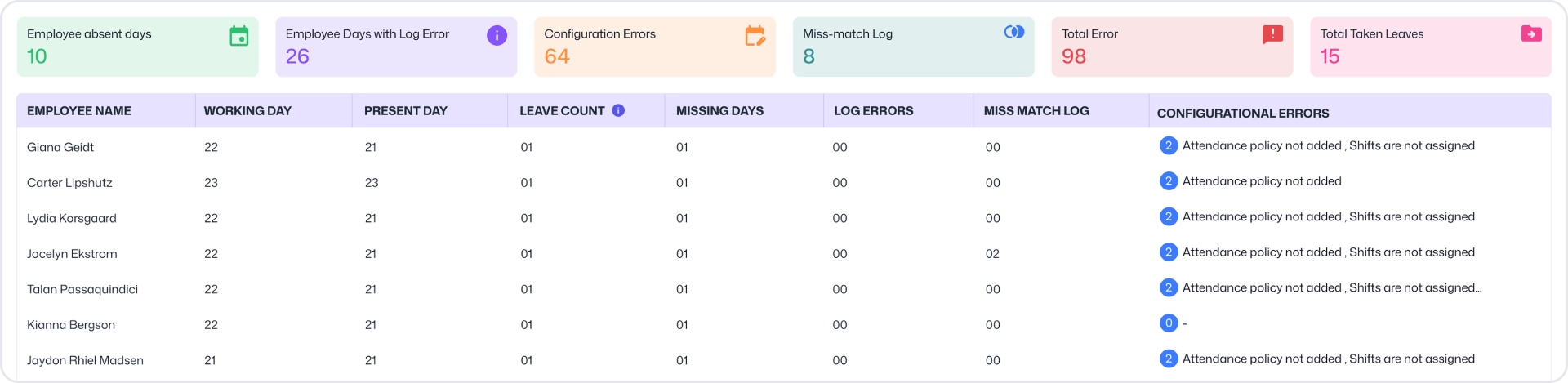
See Employees With Missing or Incorrect Attendance Data
Review working days, present days, leave counts, missing days, and attendance-related issues that can change an employee's salary.
Find Configuration Errors Before Processing Salary
Identify issues such as missing salary setup, unassigned shifts, attendance policies, missing salary headers, and other configuration problems.
See All Payroll Errors in One Place
Get a quick view of missing days, log errors, mismatch logs, configuration errors, and total issues that need attention.
Find Any Employee's Salary Record in Seconds
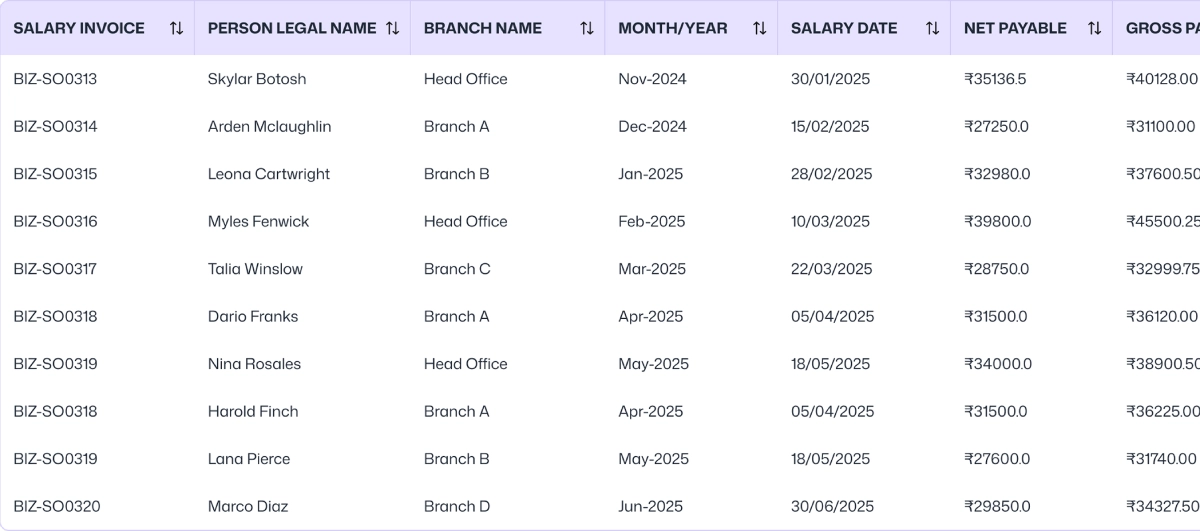
Search and filter salary records by employee, salary invoice, legal name, branch, month, or year, then open the exact salary record you need to review.
Search Salary Records by the Details You Know
Filter salary records by salary invoice, employee, branch, month, year, and other available salary details to quickly find the required record.
Review Salary & Payment Details at a Glance
See salary date, transaction date, gross payable, and net payable directly in the salary management list.
See Exactly How an Employee's Salary Was Calculated
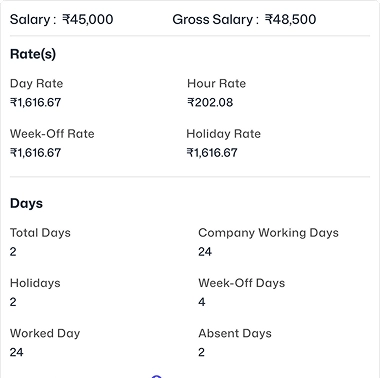
Open the employee salary record and trace the calculation from salary rates and attendance through earnings, deductions, contributions, adjustments, and final net payable.
Review Salary Rates, Days, Hours, and Attendance
Check salary and gross salary, day and hour rates, working days, holidays, week-offs, worked and absent days, total hours, and the employee's attendance calendar.
Check Leave, Overtime, Late Coming, and Salary Adjustments
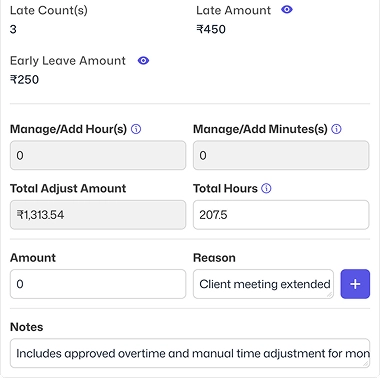
Review paid and unpaid leave, late counts, early leave, overtime, add/remove time, overtime adjustments, and other inputs that affect the employee's salary.
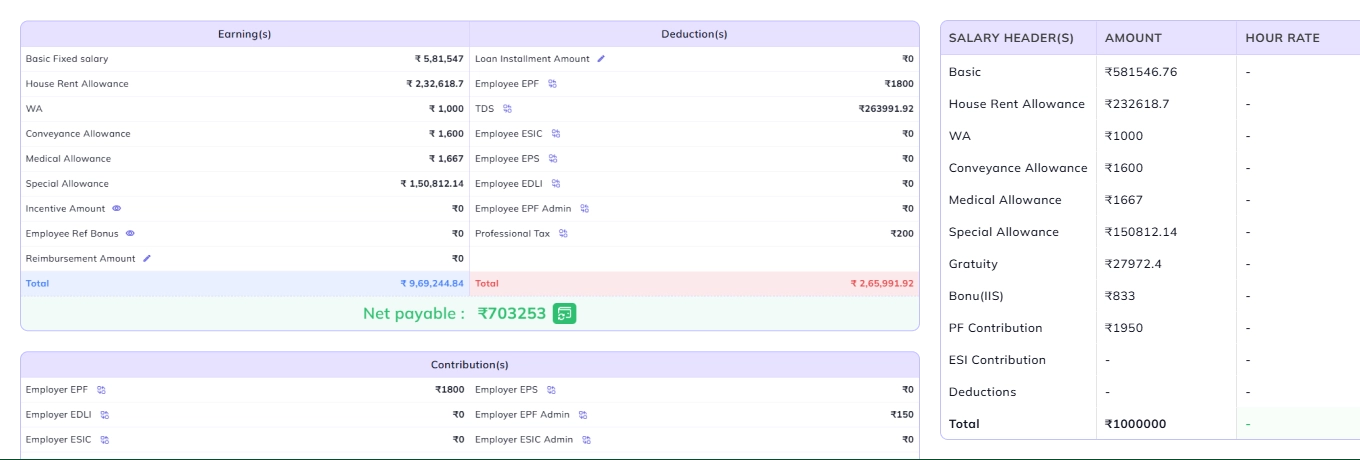
Verify Earnings, Deductions, Contributions, and Net Payable
Review salary components, incentives, allowances, bonuses, reimbursements, taxes, PF, ESIC, penalties, contributions, and other applicable adjustments before confirming the final payable amount.
Correct Available Salary Values Before Finalizing Payroll
Edit the available salary values or add an adjustment with a reason when a correction is required, then recalculate the employee's salary.
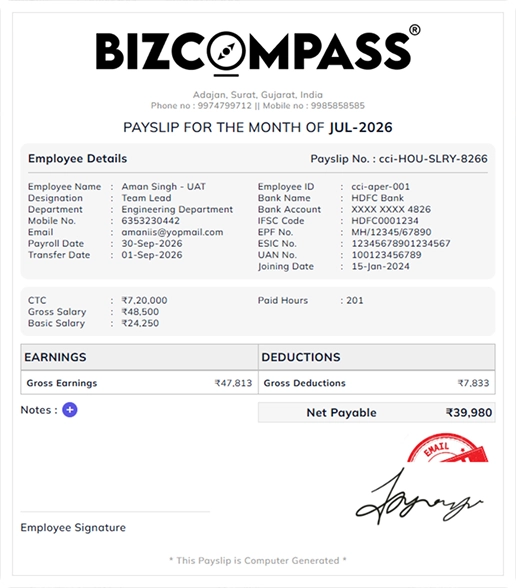
Turn Processed Salary Into an Employee Payslip
Give employees a clear salary document directly from processed payroll, with the earnings, deductions, and final salary generated from their payroll record.
Open the Payslip Directly From the Salary Record
Access the employee's payslip from the processed salary record without leaving the payroll workflow.
Keep the Payslip Connected to the Processed Salary
Present the processed salary information in the configured payslip format so the employee receives the same payroll figures that were processed.
Give Employees Access Through Self-Service
Make available payslips accessible to employees through the employee self-service experience.